How to Create UAE PASS without Emirates ID (Online Registration)

Registration at UAE PASS without Emirates ID is possible. Many people do not know that they can create a UAE PASS Account without Emirates ID and access basic services through the mobile app.
How to Create UAE PASS Account without Emirates ID
You must have the UAE PASS mobile app on your phone to register yourself for creating a UAE PASS Account.

Get UAE PASS App for iPhone or iPad
To create your UAE PASS Account without Emirates ID, you should follow the steps given below.
Step 1: Open UAE PASS App

Open the UAE PASS App on your mobile phone and wait for the first screen to load.
Step 2: Tap on Create Account
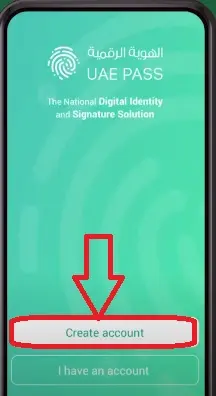
Here you have two options called Create Account and I have an account. Just tap on “Create Account” option as you want to register in UAE PASS App for the first time.
Step 3: Accept Terms & Conditions and Continue
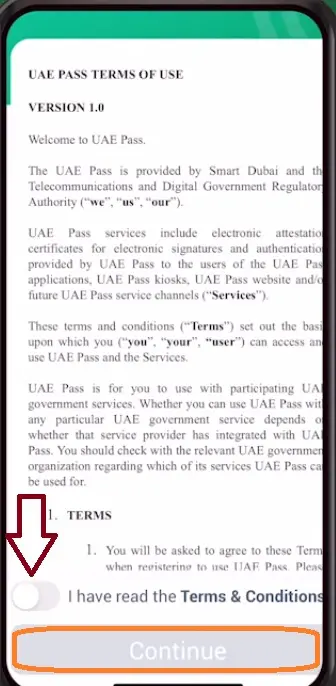
Read the Terms & Conditions and tap on the toggle to accept them. Thereafter tap on Continue button.
Step 4: Tap on No, I don’t have an Emirates ID

A question “Do you have an Emirates ID?” will appear on top of the screen. Kindly tap on the answer given as “No, I don’t have an Emirates ID.”
Step 5: Provide Your First Name and Last Name
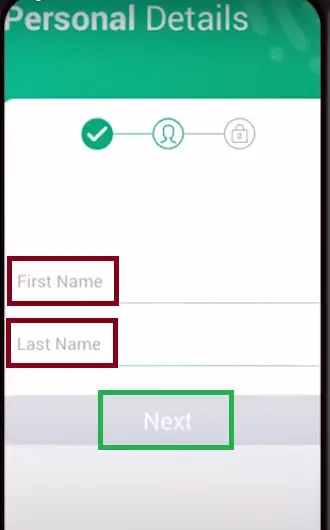
Enter your First Name and Last Name same as mentioned on your passport. Then tap on Next button.
Step 6: Enter Your Mobile Number and Email
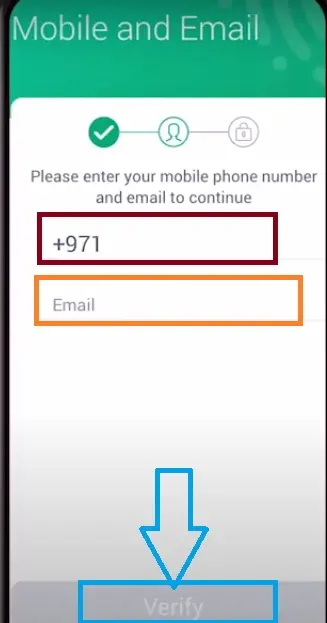
Enter your mobile number and email address, then tap on “Verify” button. Make sure both the mobile number email are active as you are going to receive the OTP for verification purposes.
Step 7: Verify Your Mobile Number and Email with OTP
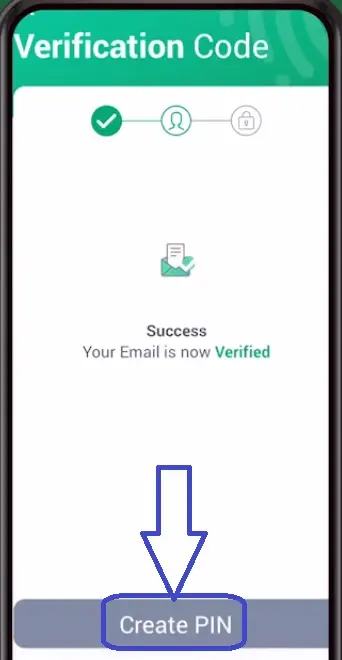
Firstly, enter the six digit OTP received on your mobile number and secondly, enter another six digit OTP received on your email. Thereafter tap on Create PIN option.
Step 8: Create New PIN for UAE PASS Sign-In

You need to create a four digit PIN that you want to use for signing-in to UAE PASS App on your mobile. Create a PIN that you can remember easily, enter the PIN twice to confirm PIN Creation Process.
Step 9: UAE PASS Basic Account is Created

A message will appear on screen as “Well Done, you have successfully registered your UAE PASS account, Basic Account.” So, your UAE PASS account is created without Emirates ID. Now, tap on Verify my account later to finish the process.
UAE PASS Account without Emirates ID [Features]
The UAE PASS without Emirates ID is a basic account. It does not offer all the features. With a basic account in UAE PASS app, you get a few features that are mentioned as follows.
- Limited Access to Digital Services available in UAE PASS App.
- Verify Document Feature is also available.
Unavailable Features:
Registration in UAE PASS without Emirates ID does not include following features.
- User identity remains unverified
- Cannot add digital signature to any document
- Cannot add a document to UAE PASS App
- Not capable for Digital Vault (Court approved signature)
Types of UAE PASS Account
There are three types of UAE PASS Account available for users. At the time of registration, the user can choose the type of account.
- UAE PASS Basic Account
- UAE PASS Advanced Account
- UAE PASS Qualified Account
You can create a basic account by using your mobile number and email without any other document. Therefore your identity remains unverified and you get access to limited features in UAE PASS app.
If you want to access more UAE PASS features, you should register for the Advanced Account or Qualified Account or you can upgrade your UAE PASS account using your Passport or GCC ID.
Wrapping Up
The UAE PASS Registration is necessary to access the services offered by the Government of UAE. Any individual with or without an Emirates ID can create a UAE PASS Account in two minutes.
I have shared the UAE PASS without Emirates ID online process and its features. For more queries, you can contact the UAE PASS Helpline Number 600 56 1111 or send an email to [email protected].
FAQs
Can I create a UAE PASS account without Emirates ID?
Yes, you can create a UAE PASS account even if you don’t have an Emirates ID.
Is UAE PASS Registration available for tourists?
Yes, the UAE PASS Registration is available for tourists. They can choose to register for UAE PASS basic account with OTP verification on their mobile number and email.
Can I create a UAE PASS account on its website?
No, you cannot create a UAE PASS account on its website, you have to download the UAE PASS app on your mobile phone and use the app to create your account.
How do I upgrade UAE PASS without Emirates ID?
You can use your Passport or GCC ID to upgrade UAE PASS without Emirates ID.